

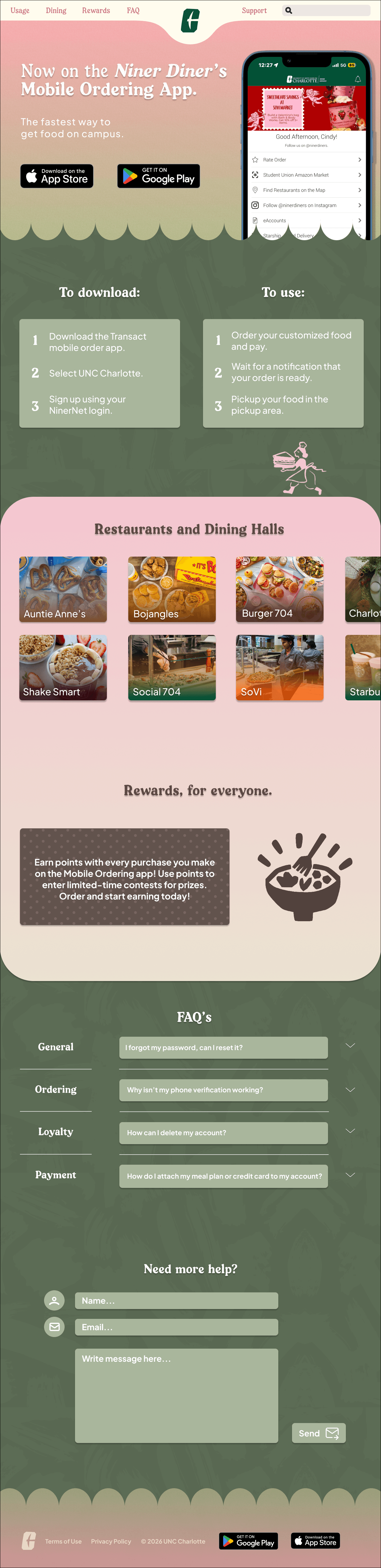
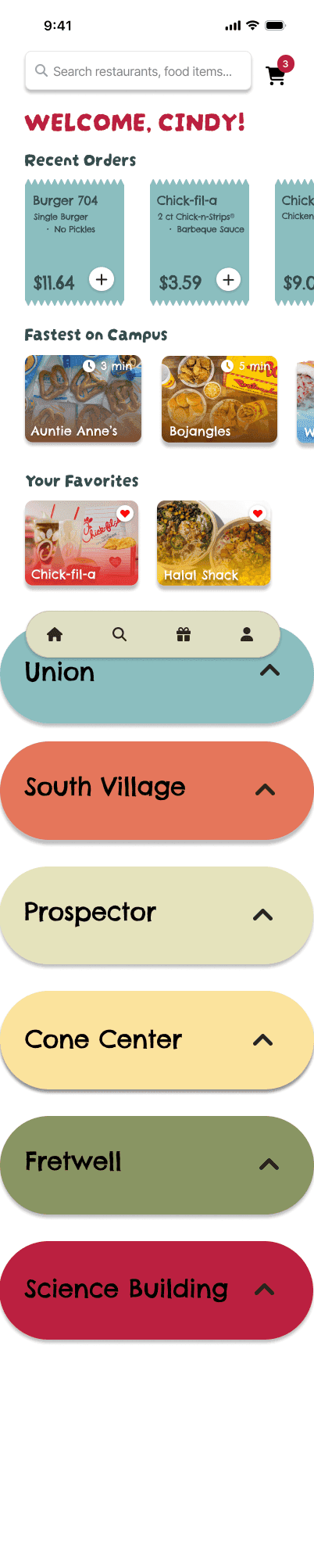
UI design for a campus food ordering app, with app screens and a landing page.
Service
UI/UX Design, App Design
Programs
Figma, Illustrator
Year
2025
01
/portfolio
UI design for a campus food ordering app, with app screens and a landing page.
Service
UI/UX Design, App Design
Programs
Figma, Illustrator
Year
2025
scroll ↓
scroll ↓
(01)
Fitting recent orders, search, and fast places on a small screen without crowding it. I put the most-used things at the top and cut the rest.
(02)
I designed around how students actually order: between classes, in a hurry, usually from the same few places. That’s why recent orders and favorites are on the home screen. I kept the look warm and friendly so the app feels easy to use. The landing page explains the app quickly and gets people to download it.
(03)
Connected screens that let someone order in just a few taps. Recent orders and favorites on the home screen fit how students order between classes, and the warm, friendly look and quick landing page make the app easy to understand and download.
(01)
Overview
College Life Topic: Mobile Ordering App
I have chosen to redo the “Mobile Order” app offered by UNCC that lets you order ahead at their food services online. For all students and people alike, time is one of the most important aspects of their day. Streamlining the experience will improve this app tremendously. This topic resonates with me because aside from Canvas, it’s the only other UNCC app I use on my phone. Students going into class on an empty stomach will hinder their ability to learn.
(02)
Concept
Audience
UNCC students that need to make it to their next class or office hours meeting.
Key message
“Order ahead. Study instead.”
Project goals
Make ordering faster. Reorder faster. Make the website more visually appealing.
(03)
Competitors
mobile app
DoorDash
Online food ordering and food delivery app and website. A little bit more cluttered, but they have a lot of restaurant options so this makes sense. Tile-based layout. Lots of sorting options, including by what they have (sandwiches, appetizers, etc. and also option to view all topics at the same time), most ordered, healthier, protein, etc. for each restaurant. Two row tiles for food options with professional pictures. Options to let customers send in their own pictures (for credit as well). Order again section for past order in the restaurant menu. Public reviews by customers with ratings next to food. Option to “favorite” restaurants. Way too much clutter when viewing cart, you have to scroll past old, recommended orders and random recommendations from other places to see your total, unless you continue to checkout right away. Option for group ordering. Good location for search bar as opposed to Uber Eats. Sometimes photos for restaurants do not match up.
desktop website
DoorDash
First thing you see is an offer and search bar for your address, then small bits for information: “Become a Dasher, Become a Merchant, and Get the best DoorDash experience.” Becoming a Dasher and merchant options are repeated below, which might not be needed due to redundancy. No actual information about the service (food delivery/pickup). Lots of blank white space on the sides. Then, you can find information about the service. Sections look like they don’t belong. Grocery and convenience stores are separated from the beauty, floral, and pet section, with grocery having its own style. Bad hierarchy. Subtitles are bigger than titles. “Get more from your neighborhood” section is useless. Information at the bottom is very cluttered and some of them from the “Popular Categories” are redundant, like “Pepsi” and “Local Eats Deserve Pepsi.” Honestly, this entire section can be scratched. “Dasher Central” seems like an important button to be highlighted.
mobile app
Uber Eats
Another popular food delivery and pickup service. Similar layout to DoorDash with changes. Good hierarchy (good use of bold and regular typefaces). Past items tab looks very large. Tile based design. Good navigation bar that DoorDash doesn’t have, “Explore” option has multiple options, UE also has a “Grocery” tab. “Grocery” tab has good call to action for ideas, “Plan a date night, Movie night, Fuel your fitness, etc. “Stores Near You” section looks too big. Retail stores are buried, and confusing since it’s in “Groceries.” First options on landing page are feature, places you might like. DD’s has past orders, which is more helpful for quick ordering. “Account” tab is very cluttered. “Lists” are barely used. Regular Uber features should stay on Uber, not Uber Eats. Preferences should be in fewer options. Bell icon is usually for notifications, but it takes you to “Promotions.” This is very misleading and not needed.
desktop website
Uber Eats
Lots of empty space on sides. No information about service. Edges of squares are not rounded, creating a sharp look. “All Restaurants” spread looks a little overwhelming, no breaks and have rounded edges for squares, but is different for “Restaurants” tab. Good sectioning with closed restaurants at the bottom of the list. No restaurants near me (Most likely due to the weather, even though I’ve ordered Uber Eats to my place before). Having restaurants show up even though not currently available would be helpful for browsing. Store spread is simple with good searching options. No photos in cart menu. No guest ordering. Restaurant and grocery/alcohol tab looks a little different and not cohesive.
mobile app
Grubhub
Landing page is cluttered with ads, offers, and options, but no actual restaurants at first glance. Icons and UI are clear and cohesive. No search tab in navigation bar, but there is an “Offers” tab (which I frequent, to be honest, so this is helpful). Again, this “Offers” tab is cluttered with the GrubHub+ ad, “Resturant Rewards,” and “Curated Offers.” “Curated Offers” seems redundant. Same with the other screens, after opening a restaurant, you’re met with a photo of the food that takes up half the screen. In the “Account” tab, a lot of options are shown, but personal identifiers, like phone numbers and email, can all be put into a “Profile” option to save room and clutter. Good group order options and integration with Amazon Prime. Not all food items have photos included, but when they do, photos look so professional that it almost looks like AI, but some photos are cut off and can be resized. Good customization page where you can see every option at once.
desktop website
Grubhub
Landing page UI is simple and okay. Information bubbles start with photos then have no photos. White space on sides. Bottom information hub is EXTREMELY cluttered with locations. Love the map with icons for locations, but clicking on an icon doesn’t bring it up on the side for a quick view. Good UI and sizing for restaurant options page. Website is not optimized. Clicked on a restaurant for it to not go anywhere. Clicked on another restaurant for it to refresh the page a bunch of times. Lots of white space while viewing a restaurant and it’s items, so information looks squished. Orientation could be in a row format and not column based to eliminate white space. Good customization page, but no icons. No icons in cart view. Not able to view reviews. Search bar within restaurant page is quite small. Grubhub+ with Prime could be in a different location so menu items and subtitles could be lined up. Not able to start multiple orders at once.
mobile app
DoorDash
Online food ordering and food delivery app and website. A little bit more cluttered, but they have a lot of restaurant options so this makes sense. Tile-based layout. Lots of sorting options, including by what they have (sandwiches, appetizers, etc. and also option to view all topics at the same time), most ordered, healthier, protein, etc. for each restaurant. Two row tiles for food options with professional pictures. Options to let customers send in their own pictures (for credit as well). Order again section for past order in the restaurant menu. Public reviews by customers with ratings next to food. Option to “favorite” restaurants. Way too much clutter when viewing cart, you have to scroll past old, recommended orders and random recommendations from other places to see your total, unless you continue to checkout right away. Option for group ordering. Good location for search bar as opposed to Uber Eats. Sometimes photos for restaurants do not match up.
desktop website
DoorDash
First thing you see is an offer and search bar for your address, then small bits for information: “Become a Dasher, Become a Merchant, and Get the best DoorDash experience.” Becoming a Dasher and merchant options are repeated below, which might not be needed due to redundancy. No actual information about the service (food delivery/pickup). Lots of blank white space on the sides. Then, you can find information about the service. Sections look like they don’t belong. Grocery and convenience stores are separated from the beauty, floral, and pet section, with grocery having its own style. Bad hierarchy. Subtitles are bigger than titles. “Get more from your neighborhood” section is useless. Information at the bottom is very cluttered and some of them from the “Popular Categories” are redundant, like “Pepsi” and “Local Eats Deserve Pepsi.” Honestly, this entire section can be scratched. “Dasher Central” seems like an important button to be highlighted.
mobile app
Uber Eats
Another popular food delivery and pickup service. Similar layout to DoorDash with changes. Good hierarchy (good use of bold and regular typefaces). Past items tab looks very large. Tile based design. Good navigation bar that DoorDash doesn’t have, “Explore” option has multiple options, UE also has a “Grocery” tab. “Grocery” tab has good call to action for ideas, “Plan a date night, Movie night, Fuel your fitness, etc. “Stores Near You” section looks too big. Retail stores are buried, and confusing since it’s in “Groceries.” First options on landing page are feature, places you might like. DD’s has past orders, which is more helpful for quick ordering. “Account” tab is very cluttered. “Lists” are barely used. Regular Uber features should stay on Uber, not Uber Eats. Preferences should be in fewer options. Bell icon is usually for notifications, but it takes you to “Promotions.” This is very misleading and not needed.
desktop website
Uber Eats
Lots of empty space on sides. No information about service. Edges of squares are not rounded, creating a sharp look. “All Restaurants” spread looks a little overwhelming, no breaks and have rounded edges for squares, but is different for “Restaurants” tab. Good sectioning with closed restaurants at the bottom of the list. No restaurants near me (Most likely due to the weather, even though I’ve ordered Uber Eats to my place before). Having restaurants show up even though not currently available would be helpful for browsing. Store spread is simple with good searching options. No photos in cart menu. No guest ordering. Restaurant and grocery/alcohol tab looks a little different and not cohesive.
mobile app
Grubhub
Landing page is cluttered with ads, offers, and options, but no actual restaurants at first glance. Icons and UI are clear and cohesive. No search tab in navigation bar, but there is an “Offers” tab (which I frequent, to be honest, so this is helpful). Again, this “Offers” tab is cluttered with the GrubHub+ ad, “Resturant Rewards,” and “Curated Offers.” “Curated Offers” seems redundant. Same with the other screens, after opening a restaurant, you’re met with a photo of the food that takes up half the screen. In the “Account” tab, a lot of options are shown, but personal identifiers, like phone numbers and email, can all be put into a “Profile” option to save room and clutter. Good group order options and integration with Amazon Prime. Not all food items have photos included, but when they do, photos look so professional that it almost looks like AI, but some photos are cut off and can be resized. Good customization page where you can see every option at once.
desktop website
Grubhub
Landing page UI is simple and okay. Information bubbles start with photos then have no photos. White space on sides. Bottom information hub is EXTREMELY cluttered with locations. Love the map with icons for locations, but clicking on an icon doesn’t bring it up on the side for a quick view. Good UI and sizing for restaurant options page. Website is not optimized. Clicked on a restaurant for it to not go anywhere. Clicked on another restaurant for it to refresh the page a bunch of times. Lots of white space while viewing a restaurant and it’s items, so information looks squished. Orientation could be in a row format and not column based to eliminate white space. Good customization page, but no icons. No icons in cart view. Not able to view reviews. Search bar within restaurant page is quite small. Grubhub+ with Prime could be in a different location so menu items and subtitles could be lined up. Not able to start multiple orders at once.
mobile app
DoorDash
Online food ordering and food delivery app and website. A little bit more cluttered, but they have a lot of restaurant options so this makes sense. Tile-based layout. Lots of sorting options, including by what they have (sandwiches, appetizers, etc. and also option to view all topics at the same time), most ordered, healthier, protein, etc. for each restaurant. Two row tiles for food options with professional pictures. Options to let customers send in their own pictures (for credit as well). Order again section for past order in the restaurant menu. Public reviews by customers with ratings next to food. Option to “favorite” restaurants. Way too much clutter when viewing cart, you have to scroll past old, recommended orders and random recommendations from other places to see your total, unless you continue to checkout right away. Option for group ordering. Good location for search bar as opposed to Uber Eats. Sometimes photos for restaurants do not match up.
desktop website
DoorDash
First thing you see is an offer and search bar for your address, then small bits for information: “Become a Dasher, Become a Merchant, and Get the best DoorDash experience.” Becoming a Dasher and merchant options are repeated below, which might not be needed due to redundancy. No actual information about the service (food delivery/pickup). Lots of blank white space on the sides. Then, you can find information about the service. Sections look like they don’t belong. Grocery and convenience stores are separated from the beauty, floral, and pet section, with grocery having its own style. Bad hierarchy. Subtitles are bigger than titles. “Get more from your neighborhood” section is useless. Information at the bottom is very cluttered and some of them from the “Popular Categories” are redundant, like “Pepsi” and “Local Eats Deserve Pepsi.” Honestly, this entire section can be scratched. “Dasher Central” seems like an important button to be highlighted.
mobile app
Uber Eats
Another popular food delivery and pickup service. Similar layout to DoorDash with changes. Good hierarchy (good use of bold and regular typefaces). Past items tab looks very large. Tile based design. Good navigation bar that DoorDash doesn’t have, “Explore” option has multiple options, UE also has a “Grocery” tab. “Grocery” tab has good call to action for ideas, “Plan a date night, Movie night, Fuel your fitness, etc. “Stores Near You” section looks too big. Retail stores are buried, and confusing since it’s in “Groceries.” First options on landing page are feature, places you might like. DD’s has past orders, which is more helpful for quick ordering. “Account” tab is very cluttered. “Lists” are barely used. Regular Uber features should stay on Uber, not Uber Eats. Preferences should be in fewer options. Bell icon is usually for notifications, but it takes you to “Promotions.” This is very misleading and not needed.
desktop website
Uber Eats
Lots of empty space on sides. No information about service. Edges of squares are not rounded, creating a sharp look. “All Restaurants” spread looks a little overwhelming, no breaks and have rounded edges for squares, but is different for “Restaurants” tab. Good sectioning with closed restaurants at the bottom of the list. No restaurants near me (Most likely due to the weather, even though I’ve ordered Uber Eats to my place before). Having restaurants show up even though not currently available would be helpful for browsing. Store spread is simple with good searching options. No photos in cart menu. No guest ordering. Restaurant and grocery/alcohol tab looks a little different and not cohesive.
mobile app
Grubhub
Landing page is cluttered with ads, offers, and options, but no actual restaurants at first glance. Icons and UI are clear and cohesive. No search tab in navigation bar, but there is an “Offers” tab (which I frequent, to be honest, so this is helpful). Again, this “Offers” tab is cluttered with the GrubHub+ ad, “Resturant Rewards,” and “Curated Offers.” “Curated Offers” seems redundant. Same with the other screens, after opening a restaurant, you’re met with a photo of the food that takes up half the screen. In the “Account” tab, a lot of options are shown, but personal identifiers, like phone numbers and email, can all be put into a “Profile” option to save room and clutter. Good group order options and integration with Amazon Prime. Not all food items have photos included, but when they do, photos look so professional that it almost looks like AI, but some photos are cut off and can be resized. Good customization page where you can see every option at once.
desktop website
Grubhub
Landing page UI is simple and okay. Information bubbles start with photos then have no photos. White space on sides. Bottom information hub is EXTREMELY cluttered with locations. Love the map with icons for locations, but clicking on an icon doesn’t bring it up on the side for a quick view. Good UI and sizing for restaurant options page. Website is not optimized. Clicked on a restaurant for it to not go anywhere. Clicked on another restaurant for it to refresh the page a bunch of times. Lots of white space while viewing a restaurant and it’s items, so information looks squished. Orientation could be in a row format and not column based to eliminate white space. Good customization page, but no icons. No icons in cart view. Not able to view reviews. Search bar within restaurant page is quite small. Grubhub+ with Prime could be in a different location so menu items and subtitles could be lined up. Not able to start multiple orders at once.
(04)
Notes
Chick-fil-A is missing
Chick-fil-a, one of the most popular fast food restaurants on campus, is not on the app. This is insane because students are trying to eat in between their classes, which might have a 5-15 minute gap. This is not enough time to wait in line, order, wait for your food, and then eat. Having the option to order Chick-fil-a ahead of time will save a lot of time for students and let them have some food before their next class. If there is a theft issue with orders, I suggest staff should not allow people to pick up food unless you show the order and name on your phone. In the app, there will be a reminder to show your order to the staff after you order.
Invisible navigation icons
After you click on one of the items in the navigation bar, the icon turns green, which completely blends into the background, making it invisible. This might confuse the user, which could make them think the section disappeared or if they forget which screen they were on.
Cluttered landing page
There is a lot of clutter on the landing page. We can move all these options, such as “Rate Order,” “Follow @ninerdiners on Instagram,” and the other options to the “More” tab instead of the landing page.
Payment comes too early
After selecting a restaurant, you’re required to select a tender, whether that be your 49er account, DB, or credit/debit card, which creates a barrier for entry. This step is usually offered at the end of a transaction, much like in real life. I would like to move this near the end of the transaction to streamline the ordering process.
No photos of the food
There are no pictures of the food until you click on the item. This might leave students confused and make them click on different foods to pick through them. Having photos readily available will help students make decisions quicker.
Customization hides your choices
When customizing an order, you’re not able to see past decisions until you click backwards as many times as you need to. Having the options page be a one-page scroll will let students see all customizations with one scroll instead of clicking through to see each individual customization.
No cart on the home screen
There is no “cart” button on the home page. Students are not able to see their current order until go back to the location they picked. Having a shopping cart icon with the list of current orders in the corner will help with direction.
Closed locations in the way
When most of locations are closed, they should be moved into a certain location at the bottom of the screen. This will help students quickly find the current locations that are open, without scrolling through all the closed locations.
Long list, slow decision
Students have to scroll down the whole list to click on a certain place to order. An easier path could be a tile-based layout where you can swipe left and right for each location. In addition to the previous two notes, having a “Quickest Option Near You” could be a good addition to the app. Since students need to go to classes, finding the quickest food option near them would help them choose what they want to eat quicker.
Chick-fil-A is missing
Chick-fil-a, one of the most popular fast food restaurants on campus, is not on the app. This is insane because students are trying to eat in between their classes, which might have a 5-15 minute gap. This is not enough time to wait in line, order, wait for your food, and then eat. Having the option to order Chick-fil-a ahead of time will save a lot of time for students and let them have some food before their next class. If there is a theft issue with orders, I suggest staff should not allow people to pick up food unless you show the order and name on your phone. In the app, there will be a reminder to show your order to the staff after you order.
Invisible navigation icons
After you click on one of the items in the navigation bar, the icon turns green, which completely blends into the background, making it invisible. This might confuse the user, which could make them think the section disappeared or if they forget which screen they were on.
Cluttered landing page
There is a lot of clutter on the landing page. We can move all these options, such as “Rate Order,” “Follow @ninerdiners on Instagram,” and the other options to the “More” tab instead of the landing page.
Payment comes too early
After selecting a restaurant, you’re required to select a tender, whether that be your 49er account, DB, or credit/debit card, which creates a barrier for entry. This step is usually offered at the end of a transaction, much like in real life. I would like to move this near the end of the transaction to streamline the ordering process.
No photos of the food
There are no pictures of the food until you click on the item. This might leave students confused and make them click on different foods to pick through them. Having photos readily available will help students make decisions quicker.
Customization hides your choices
When customizing an order, you’re not able to see past decisions until you click backwards as many times as you need to. Having the options page be a one-page scroll will let students see all customizations with one scroll instead of clicking through to see each individual customization.
No cart on the home screen
There is no “cart” button on the home page. Students are not able to see their current order until go back to the location they picked. Having a shopping cart icon with the list of current orders in the corner will help with direction.
Closed locations in the way
When most of locations are closed, they should be moved into a certain location at the bottom of the screen. This will help students quickly find the current locations that are open, without scrolling through all the closed locations.
Long list, slow decision
Students have to scroll down the whole list to click on a certain place to order. An easier path could be a tile-based layout where you can swipe left and right for each location. In addition to the previous two notes, having a “Quickest Option Near You” could be a good addition to the app. Since students need to go to classes, finding the quickest food option near them would help them choose what they want to eat quicker.
Chick-fil-A is missing
Chick-fil-a, one of the most popular fast food restaurants on campus, is not on the app. This is insane because students are trying to eat in between their classes, which might have a 5-15 minute gap. This is not enough time to wait in line, order, wait for your food, and then eat. Having the option to order Chick-fil-a ahead of time will save a lot of time for students and let them have some food before their next class. If there is a theft issue with orders, I suggest staff should not allow people to pick up food unless you show the order and name on your phone. In the app, there will be a reminder to show your order to the staff after you order.
Invisible navigation icons
After you click on one of the items in the navigation bar, the icon turns green, which completely blends into the background, making it invisible. This might confuse the user, which could make them think the section disappeared or if they forget which screen they were on.
Cluttered landing page
There is a lot of clutter on the landing page. We can move all these options, such as “Rate Order,” “Follow @ninerdiners on Instagram,” and the other options to the “More” tab instead of the landing page.
Payment comes too early
After selecting a restaurant, you’re required to select a tender, whether that be your 49er account, DB, or credit/debit card, which creates a barrier for entry. This step is usually offered at the end of a transaction, much like in real life. I would like to move this near the end of the transaction to streamline the ordering process.
No photos of the food
There are no pictures of the food until you click on the item. This might leave students confused and make them click on different foods to pick through them. Having photos readily available will help students make decisions quicker.
Customization hides your choices
When customizing an order, you’re not able to see past decisions until you click backwards as many times as you need to. Having the options page be a one-page scroll will let students see all customizations with one scroll instead of clicking through to see each individual customization.
No cart on the home screen
There is no “cart” button on the home page. Students are not able to see their current order until go back to the location they picked. Having a shopping cart icon with the list of current orders in the corner will help with direction.
Closed locations in the way
When most of locations are closed, they should be moved into a certain location at the bottom of the screen. This will help students quickly find the current locations that are open, without scrolling through all the closed locations.
Long list, slow decision
Students have to scroll down the whole list to click on a certain place to order. An easier path could be a tile-based layout where you can swipe left and right for each location. In addition to the previous two notes, having a “Quickest Option Near You” could be a good addition to the app. Since students need to go to classes, finding the quickest food option near them would help them choose what they want to eat quicker.
(05)
User needs
Focus group: Computer Science students
For my focus group, I chose Computer Science students. They can provide a technical standpoint from being developers, and they juggle projects and assignments daily, which is a problem with time that apps might have.
Jay Riddle
Scottish American · Comp Sci, Cybersecurity
An app with options that are easily accessible, a tab where you can see your current order’s progress, easy to understand, and a navigation bar that’s easy to understand. No design input aside from incorporating UNCC’s secondary colors instead of just the green and gold.
Ben Wasko
American · Comp Sci
An app that runs fast, how few bugs are present, an easy layout, standard payment options, and discounts.
Derek Wang
Chinese · Comp Sci, AI, Robotics, Gaming
An app with well thought out location services: the ability to have the option to look at restaurants near me that I can go to early or get delivered to easily, and not too much design wise because the main point of the app would be how easily you can get food, not for looking at.
(06)
Moodboard

UNCC color palette
Charlotte Green
#005035
Niner Gold
#A49665
Quartz White
#FFFFFF
(07)
IA map

scroll ↕
(08)
Wireframes

scroll ↕